
Now Loan Payments are EASIER
& FASTER using ‘Sub-K Pay’
Sub-K Pay app is an one-stop solution where one can easily avail microfinance loans with easy and fast repayments from different banks and Fintech partners offered through Sub-K. You can easily track your EMIs, get your payment history, and download payment receipts any time anywhere.
Features of Sub-K Pay App
- It is simple, secure, and easy to use
- You can avail multiple services with a simple click
- All products & services are available 24×7 on your mobile
- EMIs can be paid digitally, so no need to worry about keeping cash at home
- You can track your EMI from submitting loan application to loan disbursement and check the payment history of all the EMI installments
- You can easily download digital payment receipts online for group/individual payments
- You can calculate their EMI payments in advance before applying for a loan
To Pay your existing MFI Loan EMIs
- Install the Sub-K Pay app from the Playstore
- Select the Bank
- Log in using your customer ID or Loan account number
- Select the Pay EMI option
- Select one or all group members for whom you would like to pay the EMI
- Pay EMI through various payment options
Currently, the application is available in English, Hindi, Bengali, Marathi, and Telugu language. More languages will be offered over the coming months.
Pay your EMI using Sub-K Pay
App
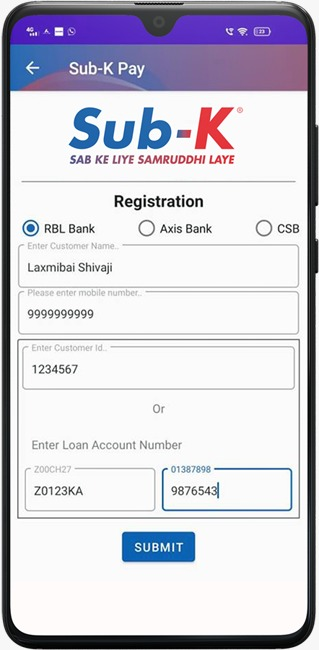
Select your bank
Select the desired bank
Name
Enter your name
Mobile Number
Enter your 10 digit mobile number
Customer ID (Or)
Enter your 7 digit Customer ID
Loan Account Number
Enter your Loan account number
Click the Submit Button
Pay Loan EMI using Sub-K Pay
Watch step-by-step video tutorials in your native language explaining how to log in, verify your dues, and complete your digital repayment.
English Tutorial
How to Pay Loan EMI on Sub-K Pay App
सब-के पे ऐप से लोन की किस्त कैसे भरें
Complete Hindi Step-by-Step Guide
Sub-K Pay ॲप द्वारे कर्जाचा हप्ता कसा भरावा
Marathi Video Demonstration
Sub-K Pay অ্যাপ দিয়ে লোনের কিস্তি কীভাবে পরিশোধ করবেন
Bengali Video Tutorial
Dos & Don’ts while doing Digital Payments
Safeguard your hard-earned funds by following these crucial microfinance digital payment guidelines.
Dos for Safe Repayments
- Verify Account Details: Always verify your Borrower Name, Customer ID (CID), and Loan Account Number before confirming any payment.
- Check Bank SMS & Balance: Review the automated confirmation SMS received from your bank and Sub-K immediately upon payment.
- Save Digital E-Receipt: Download and store the digital PDF receipt or note down the unique 12-digit Bank UTR / Reference number.
- Wait on Network Latency: If your bank account is debited but confirmation is pending, wait 15 minutes and check your passbook before retrying.
- Use Official App Only: Install the Sub-K Pay application solely from the official Google Play Store link.
Don’ts for Fraud Prevention
- Never Share Secret PINs: Do not share your UPI PIN, MPIN, OTP, or password with anyone, including Sub-K agents or bank personnel.
- No Cash Without Receipt: Never hand over physical cash to any unauthorized person without receiving an instant automated SMS or printout.
- Avoid Suspicious Links: Do not click on unknown payment or lottery links received through SMS, WhatsApp, or unsolicited emails.
- Avoid Repeated Rapid Attempts: Do not submit multiple consecutive transactions if the gateway screen is loading or processing.
- Never Install Unknown APKs: Do not install applications from third-party websites, social forums, or unauthorized file-sharing drives.